Troubleshooting
How to Reset a U-Line — and Why There Is No Reset Button
There is no reset button on a U-Line. If you want to reset one, unplug it or switch off its breaker, wait five minutes, and restore power — that is the whole procedure, and it is the only one that carries no cost. Before you do it, rule out the two modes that are mistaken for failures every week: if the degree symbol is flashing and the cabinet is not cooling, the unit is in showroom mode and the fix is to hold the light key and the power key together for five seconds; if the display is dark and the cabinet is still cold, it is in Sabbath mode and a held button brings it back. Deeper than that, the service menu — the hidden key held for ten seconds — offers factory defaults and an option that clears the error log. Do not clear the log. On this make the log is the only record of what went wrong, because U-Line displays the door error and nothing else, and clearing it before somebody has read it throws away the sequence a technician would have started from.
The full guide
How to reset u line ice maker: the honest answer first
There is no reset button on a U-Line. Not on the ice makers, not on the wine coolers, not on the refrigerators, not on the beverage centers. The search is enormous and the answer is one sentence long, which is presumably why so few pages give it.
What people mean when they search for it is one of three things, and they have very different consequences.
One: a power cycle
This is the reset that exists.
Off at the breaker or the plug, wait five minutes, back on. Five minutes rather than five seconds — a compressor that has just stopped is sitting against a head of pressure and needs the system to equalize before it can start again. Switching straight back on can put it into its own overload, which then locks it out for longer than you waited.
On a built-in appliance you will be doing this at the panel rather than at the plug, because the outlet is behind the unit and the unit is in the joinery. That is normal on this make.
Two: the two modes that are not failures
Before cycling power, spend ten seconds on these, because a power cycle does not clear either of them and people spend real money finding that out.
Showroom mode. The maker's own description: the degree symbol flashes, the display is lit, the interior light works, and the unit will not cool. It exists so a dealer can stand a machine on a floor and demonstrate it. Floor models get sold, so units arrive in it. Hold the light key and the power key together for five seconds; the display flashes once and beeps.
Sabbath mode. Display and cabinet lights dark, refrigeration running normally, and on the current controls every alarm silenced as well. Hold the light key for five seconds on the older controls, or any control button for three seconds on the current ones.
Between them these account for a real share of the calls that arrive on this site described as a dead appliance.
Three: the service menu, and the thing not to do in it
The hidden button held for ten seconds puts the control into service mode; the display shows 0. Inside are the parameters the appliance runs on — defrost interval, defrost duration, evaporator fan delays, sensor offsets, compressor RPM — plus two entries that look like resets.
Factory defaults restores every parameter for whichever model number the board is programmed to. That is a genuine tool and it has a genuine trap: every U-Line control carries a two-digit model number and reads its timings from it. A replacement board that was fitted and never programmed will restore *another machine's* settings, quite happily.
Clear error log is the one to leave alone.
Why clearing the log is expensive
U-Line writes the same sentence in every manual that carries a code table: all errors are logged in memory, and only the door error is displayed and has an audible signal.
Read that twice, because it decides everything about diagnosing one of these. The appliance knows what went wrong. It wrote it down. It has no way of telling you. The only copy is in that log, in the order the errors happened, and the order is often the whole story — a door error followed by a thermistor error is a different afternoon from a thermistor error on its own.
Clearing it takes five seconds and deletes all of that. If you have called somebody out, the log is the first thing they will want, and arriving to find it cleared puts the visit back to guessing.
What a reset actually tells you
A reset is a test, and the result is which branch you land on.
- The problem is gone and stays gone. Something transient — a brownout, a control that latched, a door switch that stuck once. Worth noting the date and moving on.
- The problem returns within the hour. Whatever is wrong is still wrong. A reset has told you it is not a one-off, which is genuinely useful information.
- The problem returns in a few days. The hardest pattern and the most common on failing sensors and door switches. Write down when it happens and what the cabinet was doing.
When a reset is the wrong move
- When there is a number on the display. Photograph it first. On this make that is a rare and valuable thing to have.
- When the machine is an ice machine that has stopped and there is standing water. Cycling power on a machine with a drain problem just runs the cycle again.
- When a nugget machine is making a grinding noise. Switch it off and leave it off. The auger is being driven against something solid, and every additional minute is gearbox.
And what to have ready if it comes back
The model and serial from the plate on the upper right or the rear wall inside, whatever the display showed before you touched anything, and how long the reset held. That is more than most people arrive with, and on an appliance that hides its own diagnostics it is worth a great deal.
If it turns out to be a repair
What this leads to, and what it costs
Every job on this site is priced the same way: an on-site diagnostic first, the figure agreed in writing before anybody starts.
-
Ice maker will not turn on
A machine that shows no sign of life is a power question before it is a repair, and the maker publishes the order to ask it in. Two of the four checks need nothing but a screwdriver and none of them involves a part.
- Dark panel
- Panel lit but nothing happens
- Started after a power cut
-
U-Line: The display has gone dark but the unit is still running
U-Line — an indicator rather than a code. Sabbath mode.
What the machine is telling you -
U-Line: The display works, the light works, and the unit will not cool
U-Line — an indicator rather than a code. This is a mode, not a failure, and it is the most expensive misdiagnosis on this make.
What the machine is telling you -
Diagnostic visit
We find out what is actually wrong before anybody quotes a part. On a U-Line that starts with a question most visits skip: is the appliance reporting a problem, or is it in a mode somebody enabled by accident? A unit that lights up and will not cool is showroom mode as often as it is a sealed system, and the two are not the same conversation. The fee is credited toward the work when you go ahead.
- Modes ruled out before any part is named
- The error log read, not guessed at
- Credited toward the repair
Questions people ask about this
Where is the reset button on a U-Line ice maker?
There is not one, on any model in the range. The nearest equivalent is a power cycle: off at the breaker or the plug, five minutes, back on. Anything described online as a U-Line reset button is either a power cycle by another name or somebody's description of the service menu.
How do I reset my U-Line ice maker after cleaning?
You should not need to. The cleaning cycle completes on its own and the machine returns to making ice. If it does not, check the water supply first — a machine that was drained for cleaning and has not refilled will sit there looking reset when it is actually waiting. A power cycle after that does no harm.
My wine cooler's display is dark. Will a reset fix it?
Put your hand inside first. If the cabinet is cold, the appliance is running and the display has been switched off deliberately: that is Sabbath mode, and a held control button brings it back without cycling power at all.
What does restoring factory defaults do?
It returns every service-menu parameter — defrost interval and duration, fan delays, sensor offsets, compressor speed — to the values for whichever model the board thinks it is. That last part matters: if the board was replaced and never programmed to your machine, factory defaults restore the wrong machine's settings.
Does a reset clear an error?
It clears the symptom for a while and it does not clear the cause. A reset is a test rather than a repair: what tells you something is which branch you land on afterwards — whether the problem returns immediately, returns in a day, or does not return at all.
Troubleshooting
More guides like this one
-
Your U-Line Is Keeping an Error Log You Cannot See
Every U-Line manual says the same sentence: all errors are logged in memory, and only the door error is displayed. The numbers are real. You just are not being shown them.
Read more -
The Light Works, the Display Works, and Nothing Is Cold
On most refrigerators this points at the compressor. On a U-Line, check the degree symbol first — there is a setting that runs the display and the light and switches the cooling off entirely.
Read more -
How to Test a Refrigerator Thermistor — With the Maker’s Own Number
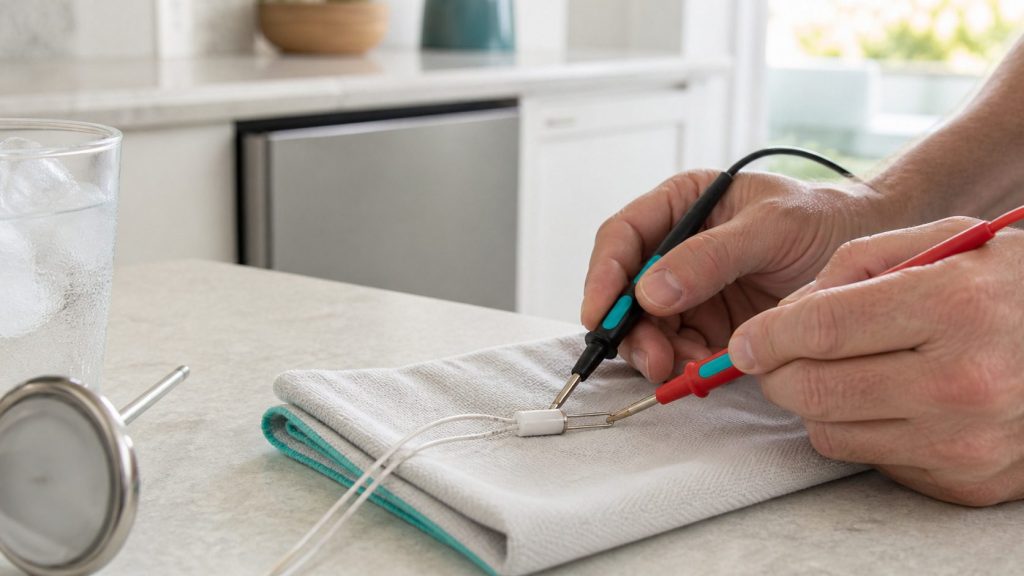
U-Line publishes the figure: about 16.1k ohms in an ice-water bath, within five percent. That turns a guess into a measurement, and on this make it is the first thing worth measuring.
Read more
Tell us the model number and what it is doing.
This article is based on:
- Official manufacturer documentation
- Internal repair procedures
- Technician repair history
- Company quality standards